

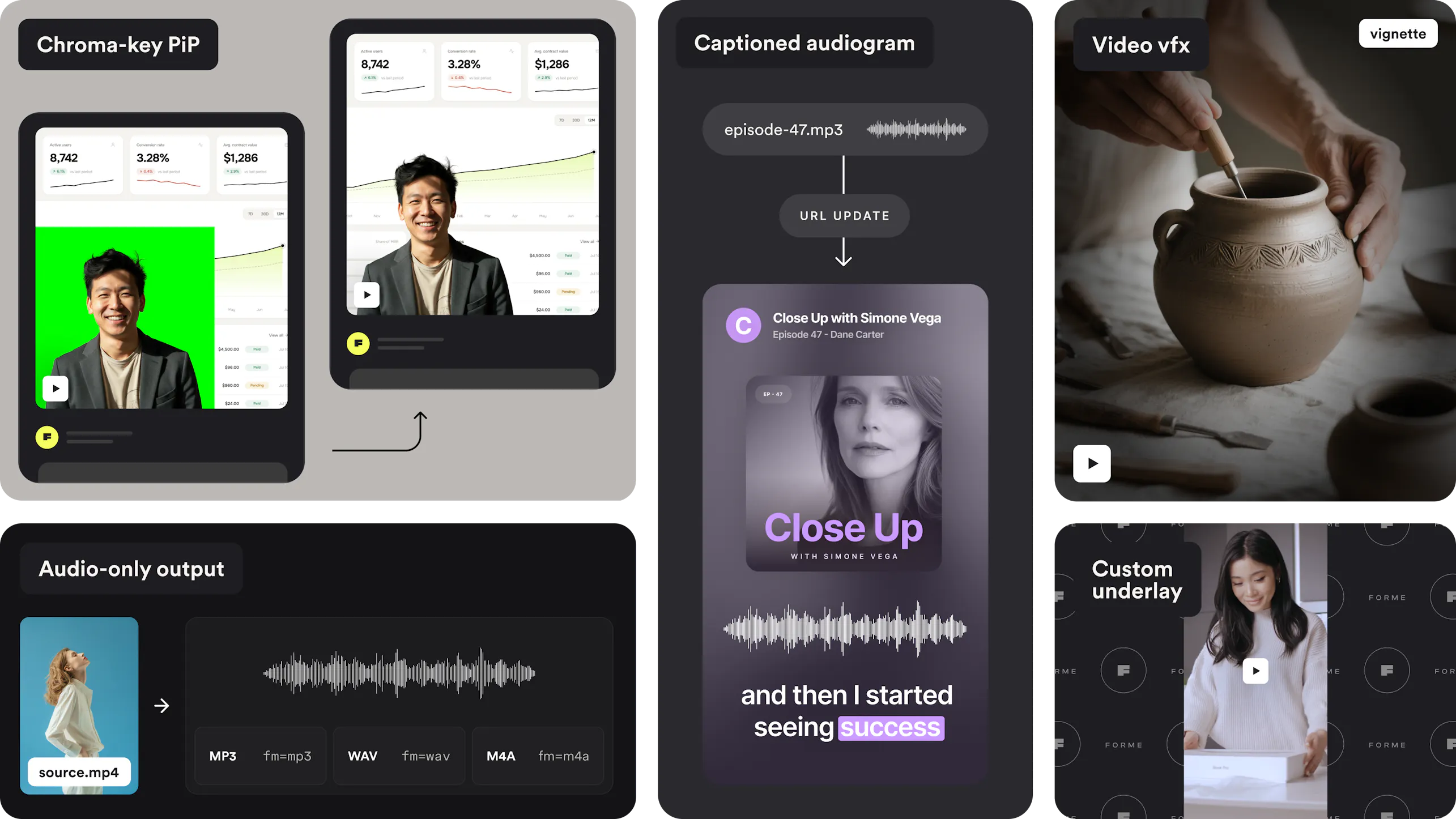
Our biggest video release yet. Captioned audiograms, real-time stabilization, chroma-key compositing, and a dozen more ways to shape your video, all from the URL.
Your video content has to work everywhere: vertical on TikTok, horizontal on YouTube, muted and autoplaying in a social feed, captioned for accessibility compliance, and stable even when it was shot handheld on a phone. Meeting all of that today usually means stitching together an editing tool, a captioning service, a stabilization plugin, and a separate audio workflow, each with its own learning curve and its own bill.
We get it. Every additional tool is another integration and another thing that breaks. This release folds fifteen new capabilities into the same URL-based video pipeline you already use, grouped into six areas. Here's a look at what's new.
Turn Any Podcast Into a Captioned Video
Point Imgix at any audio file and get back a fully captioned, waveform-animated, vertical video, ready for social in one API call.

- Audio as a source: Any MP3, WAV, or audio file becomes a valid video input, no video wrapper required.
- Captioned audiograms: Auto-generated captions, translated into 100+ languages, burned in alongside an animated waveform.
- Ken Burns motion: A moving background, panning and zooming across cover art or a photo, instead of a static image.
- Background music: Layer in a soundtrack that ducks automatically under narration.
No editor and no separate captioning tool required.
Real-Time Stabilization for Shaky Footage
Handheld and action-cam footage often needs stabilizing before it's publish-ready, and that has traditionally meant a round trip through a separate editing tool. Imgix now stabilizes shaky video directly from the URL, using the same hardware-accelerated motion analysis that already powers our smart preview tooling.
One parameter, and shaky handheld video is publish-ready.

Assemble Multiple Clips Into One Finished Video
Every published video wants the same bookends: a branded intro up front, a call-to-action card at the end, sometimes a sponsor clip in between. Editing those into every upload, and matching resolution and frame rate each time, is exactly the repetitive timeline work an API should handle.

- Intros and outros: Store one intro and one outro in your bucket and append them to thousands of videos from the URL. Change the file once and every video updates.
- Image slideshows: Turn a list of stills into a video, with per-slide durations, Ken Burns motion, and dissolves between them. No video file required.
- GPU-rendered transitions: A full catalog of fades, wipes, slides, and shape effects, plus true 3D cube and doorway moves, at every cut.
- Auto-timed scene labels: Burn a caption over any segment, timed automatically to when it is on screen.
Captions, watermarks, and thumbnails all run on the assembled video, exactly as if you had uploaded the finished cut.
Full Creative Control Over Every Frame
Compositing decisions, where a crop lands, how an overlay enters the frame, what sits behind a transparent subject, usually require a dedicated video editor.

- Chroma-key: Remove a green screen from a picture-in-picture overlay.
- Custom background: Replace letterbox bars with your own branded image when reframing video.
- Directional crop: Control exactly where a crop lands, not just the center.
- Rotation and flip: Mirror or rotate footage with one parameter.
- Bring-your-own subtitle: Burn in your own caption file instead of relying on auto-generated captions.
- Independent transitions: Different entrance and exit animations, and durations, for text and overlays.
Every one of these composes with the video transforms you're already using.
Cinematic Effects and On-Brand Playback Cues
Muted, autoplaying social clips lose the sense of where a viewer is in the video, and stock footage often looks flat next to produced content.

- Burned-in progress bar: Keeps viewers oriented even with no player controls visible.
- Video VFX: Five stylized effects: film grain, bloom, halation, vignette, and chromatic aberration, for a produced, cinematic look.
Combine any of these with your existing color grading for a fully custom look.
Extract Broadcast-Ready Audio From Any Video
Pulling a clean audio track out of a video, for a podcast feed, a transcript, or a standalone clip, usually means a separate audio tool. Imgix now extracts audio directly from any video, running it through the same loudness normalization, denoising, and EQ your video already gets. The output is broadcast-ready, not a raw rip. (2 credits per 5 minutes of output.)
Pair it with your existing trim and speed controls to pull exactly the segment you need.

See the audio-only output docs →
Trim by Percentage, Not Just Seconds
A single trim URL applied across a library of clips with different lengths doesn't hold up when every clip runs a different duration. Clip start, end, and duration now accept a percentage in addition to seconds, so one URL trims consistently across assets of any length.
A small change with an outsized effect on any templated trim workflow.

Every feature in this release runs through the same Imgix Video pipeline as everything else, so there's nothing new to integrate.
Already an Imgix customer? Check the docs or reach out to your customer success manager if you want help getting started.
New here? Start a free trial